
Appearance
Zone Tools 
Draw zones to include, exclude, or measure areas on your PDF plans.
Overview
Zone tools let you draw polygon shapes on your plans for three different purposes:
| Zone Type | Purpose | Keyboard |
|---|---|---|
| Inclusion Zone | Count only symbols inside | I |
 Exclusion Zone Exclusion Zone | Ignore symbols inside | X |
 Area Zone Area Zone | Measure floor/wall area | M |
Zone Types
Inclusion Zones
Inclusion zones filter your counts to show only symbols within the zone boundary. Useful for:
- Counting symbols in a specific room
- Breaking down takeoffs by area
- Focusing on a particular section
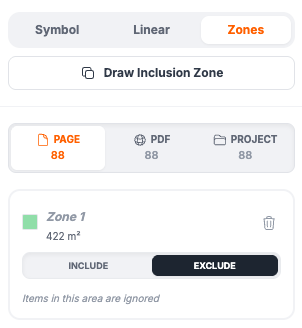
Exclusion Zones
Exclusion zones hide symbols from your counts. Useful for:
- Ignoring symbols in areas not part of scope
- Excluding existing fixtures from counts
- Removing false detections in specific areas
Area Zones
Area zones calculate the real-world area of a polygon shape. Useful for:
- Measuring floor area for flooring estimates
- Calculating wall coverage
- Surface area calculations
How to Draw Zones
- Press the keyboard shortcut for your zone type (I, X, or M)
- Click to place vertices of your polygon
- Double-click or click on the first point to close the zone
- The zone is created and applied immediately
INFO
For detailed zone documentation, see the Zones feature page.
Keyboard Shortcuts
| Key | Action |
|---|---|
I | Inclusion Zone tool |
X | Exclusion Zone tool |
M | Area Zone tool |
Escape | Cancel zone drawing |
Delete | Delete selected zone |