
Appearance
Tools Overview
Plan Count provides a comprehensive set of tools for working with PDF plans. Access tools from the floating toolbar on the left side of the canvas.
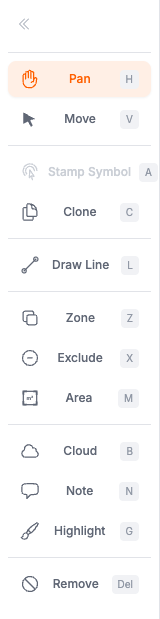
Tool Categories
Navigation Tools
| Tool | Shortcut | Description |
|---|---|---|
 Pan | H | Click and drag to move around the PDF |
 Select | V | Select and edit detections, zones, and annotations |
Symbol Tools
| Tool | Shortcut | Description |
|---|---|---|
 Stamp | A | Manually place symbol detections |
 Clone | C | Copy and place symbol detections |
 Eraser | E | Remove unwanted detections |
Measurement Tools
| Tool | Shortcut | Description |
|---|---|---|
 Linear | L | Draw paths to measure cable runs and lengths |
Zone Tools
| Tool | Shortcut | Description |
|---|---|---|
 Inclusion Zone | Z | Filter counts to symbols inside the zone |
 Exclusion Zone | X | Ignore symbols inside the zone |
 Area Zone | M | Measure floor/wall area |
Annotation Tools
| Tool | Shortcut | Description |
|---|---|---|
 Cloud Box | B | Draw revision clouds around areas |
 Text Annotation | N | Add text annotations |
 Highlight | G | Highlight regions with transparent overlay |
Toolbar Modes
The toolbar can be collapsed (showing only icons) or expanded (showing icons with labels). Click the expand/collapse button at the bottom of the toolbar to toggle between modes.
Quick Tips
- Hover over any tool to see its name and keyboard shortcut
- Press a shortcut key to quickly switch tools without clicking
- Press
Vto return to Select mode after using any drawing tool - Press
Escapeto cancel any in-progress drawing operation